Reaching your .numa services from any device on the tailnet
If you’ve already made a Numa node your tailnet resolver, every device on the tailnet resolves DNS through it. The natural next step is reaching local services on my dev machine from my mobile phone.
I configured peekmtail.numa serving peekm - a
single-binary markdown viewer I run on my laptop to read the
.md notes, documents and Claude plans I’m working on. Being
able to pull those up on my phone, away from the desk, is the whole
reason I wanted this to work.
How it fits together
In my setup the Numa node (an always-on Pi Zero) and the laptop
running peekm are two separate machines on the tailnet. That’s why,
below, peekm ends up seeing a connection from the node’s tailnet IP
rather than from localhost - and has to be told to trust it. (If you run
the service on the same machine as Numa, target_host stays
localhost, the backend just sees a normal loopback
connection, and you can skip the backend-trust step.)
Three hops, and each one had to be made tailnet-aware:
- DNS - the phone asks the Numa node for
peekmtail.numa. The node answers with the address that faces the requesting device - its tailnet IP for a tailnet client, not its LAN IP - because that’s what the phone can route to. This is the 0.21 per-client-egress fix; nothing to configure. - Proxy - the phone opens
http://peekmtail.numa, which lands on the node’s reverse proxy. The proxy looks up the service by hostname and forwards to the backend. - Backend - your actual service (here, peekm on a laptop) receives the forwarded request and serves the page.
The setup below is what makes hops 2 and 3 work across the tailnet.
1 - Register the service
Point a .numa name at peekm - via the dashboard’s
Local Services panel (a name, the port peekm listens
on, and a target host):
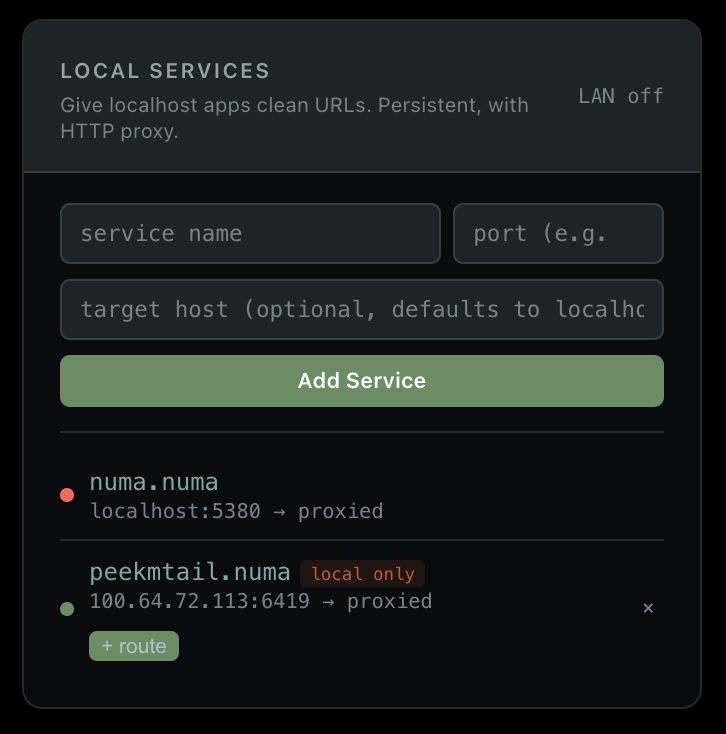
The same thing in numa.toml:
[[services]]
name = "peekmtail"
target_port = 6419
target_host = "100.64.72.113"   # the laptop's tailnet IP, where peekm runs
target_host defaults to localhost - set it
to the laptop’s tailnet IP because peekm runs on a different machine
than the Numa node.
2 - Bind the proxy off loopback
By default Numa’s .numa proxy listens on
127.0.0.1 - fine for the local machine, invisible to the
tailnet. Bind it to all interfaces so it answers on the node’s tailnet
IP. In numa.toml:
[proxy]
bind_addr = "0.0.0.0"
Restart Numa and confirm the proxy moved:
ss -ltn | grep ':80 ' # expect 0.0.0.0:80, not 127.0.0.1:80A word on exposure. As of 0.21 the proxy honors
[server].allow_from - the same ACL as DNS, on both port 80
and 443, with loopback always allowed and an empty list meaning
allow-all. So binding to 0.0.0.0 doesn’t mean “open to
every network”: set the allowlist to your tailnet (and LAN, if you want
it) and the proxy only answers those peers.
[server]
allow_from = ["100.64.0.0/10", "192.168.1.0/24"]
100.64.0.0/10 is Tailscale’s CGNAT range. The proxy also
only ever forwards to registered .numa services regardless
of who connects.
3 - Let the backend accept the proxy
This is the step that’s easy to miss. The proxy forwards from the
node’s tailnet IP, so your backend sees a connection from
100.65.127.63, not from the phone and not from localhost.
Many local-first tools - peekm included - reject anything that isn’t
loopback. They need to be told the tailnet is trusted.
For peekm that’s one flag:
peekm --trusted-cidr 100.64.0.0/10 ~/projects100.64.0.0/10 admits the Numa node (and any tailnet
peer) and nothing outside. Your own services will have their own
equivalent - the principle is the same: allow the Numa node’s tailnet
IP, not just 127.0.0.1. The backend can’t see which device
originated the request (the proxy doesn’t forward the client IP), so
per-device rules belong in Tailscale ACLs, not the backend.
4 - Confirm it from the phone
Open http://peekmtail.numa on the phone. The proof is in
the node’s query log: the phone’s tailnet IP shows up resolving the
name, and the answer is the node’s tailnet address.
100.81.95.112 A peekmtail.numa NOERROR local 1ms -> 100.65.127.63That’s phone -> DNS over WireGuard -> node, then phone -> proxy over WireGuard -> node -> backend. No part of it touched the local network, and the phone installed nothing.
On certs
Everything above is plain HTTP on port 80, so there’s no certificate
and nothing to trust on the phone - WireGuard already encrypts the hop.
If you’d rather use https://peekmtail.numa (port 443), Numa
mints a cert from its own CA, and then the phone needs that CA installed
and trusted (on iOS that’s the two-step
install-profile-then-enable-in-Certificate-Trust-Settings dance). For a
tailnet you control, plain HTTP over WireGuard is usually the simpler
call.